AI video model by Kuaishou

Kling 4 AI Video Generator

Use Kling 4 online: turn a text prompt, a photo, or a first and last frame into a 720p AI video of 3 to 15 seconds, with sound on every clip.

Try

Kling 4 examples

Kling 4 video examples

Unedited Kling 4 outputs, each generated from a short prompt or a single image.

An older couple walks hand in hand under red maples
A knight fights off attackers at a castle gate
A drone races down a neon street and up over the skyline
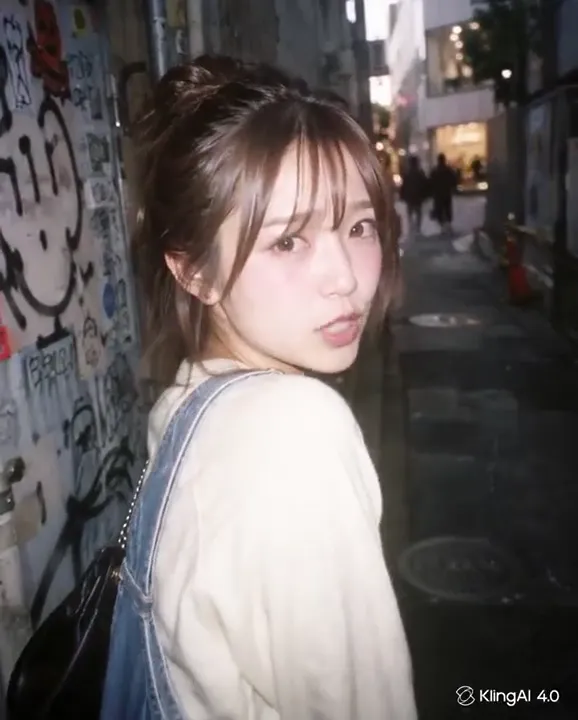
A street portrait that turns and leans toward the camera
A bride and a quiet man in a laundromat
A scythe warrior faces a fire-breathing pumpkin giant

Kling 4 features

01Sound on every clip

Kling 4 always renders audio with the video; there is no silent mode and no off switch. That suits clips you post straight away: footsteps on a wet street, a cheering crowd, a kettle starting to whistle. Write what should be heard next to what happens on screen, for example “rain on the window, no music”.

02First and last frame control

Add a first frame and a last frame, and Kling 4 generates the motion between them. Use it for a before-and-after, a room going from empty to furnished, or a product turning from front to back. Choose two photos of the same scene with the same aspect ratio, and let the prompt describe how the change happens.

03Animate photos in 2K

Add one image as the first frame and Kling 4 brings it to life, keeping your photo’s aspect ratio: a vertical phone shot makes a vertical clip, a wide landscape makes a wide one. Try a street portrait turning to the camera, a plate of food with rising steam, or a sleeping cat waking up. Your prompt only needs motion and sound.

04Five durations from 3 to 15 seconds

Choose 3, 5, 8, 10 or 15 seconds. Three seconds is enough to test a prompt, make a loop or a reaction; 15 seconds fits a short scene with setup and payoff. Write one idea per clip, open on the subject so the first frame already tells the story, and land the payoff before the last second.

05Four aspect ratios in text mode

Without an image, choose the frame yourself: 9:16 for TikTok, Reels and Shorts, 16:9 for YouTube, 1:1 for feeds, or 21:9 for cinematic widescreen. Every ratio works with every length from 3 to 15 seconds, always in 720p.

06720p for phones and social

Kling 4 renders every clip in 720p on this site, in all modes and at every length. With a single quality setting, you only choose the duration, plus the aspect ratio in text mode. On phones and social feeds, where most short videos are watched, 720p looks good.

Kling 4 specs

Developer
Kuaishou
Modes
Text to video · Image to video
Duration
3–15s3s · 5s · 8s · 10s · 15s
Resolution
720p
Aspect ratios, text to video
9:1616:91:121:9
Aspect ratios, image to video
Keeps image ratio
Sound
Generated with the picture, always on
4

Kling 4

720p clips from 3 seconds, always with sound

  • 3–15 s in 720p
  • Sound on every clip
  • First and last frame
Create · Kling 4

How to use Kling 4

  1. 01

    Write a prompt or add photos

    Write who is in the clip, what they do, where the camera is and what we hear. For image to video, drop a photo into the first-frame slot, and add a second as the last frame if the clip should end on it.

  2. 02

    Set ratio and duration

    In text mode, pick one of four aspect ratios, then 3, 5, 8, 10 or 15 seconds. Resolution is fixed at 720p and sound is always on, so there is nothing else to set.

  3. 03

    Generate and download

    Press Create; the button shows the credit cost before anything is charged. Sign in and top up only when needed, then download the MP4 or find it later in My videos.

Kling 4 FAQ

What is Kling 4?

Kling 4 (also called Kling 4.0 or Kling AI 4) is an AI video generation model from Kuaishou. It creates short clips from a text prompt, one starting image, or a first and last frame, and always renders sound with the picture. On Copy AI Video you can use it on this page or select it in the text to video and image to video tools.

How long can a Kling 4 video be?

From 3 to 15 seconds, with options of 3, 5, 8, 10 and 15 seconds. Credits are charged per second, so shorter clips cost less, and 3 seconds is a cheap way to test a prompt. For one continuous take longer than 15 seconds, switch to Seedance 2.5, which reaches 30 seconds at 480p or 720p.

What resolution does Kling 4 output?

Every Kling 4 clip on this site renders in 720p, at every length and in every mode. With a single quality setting, you only choose the duration, plus the aspect ratio in text mode. If you need more detail for a clip of 15 seconds or less, MiniMax H3 renders in 2K.

Can I turn off sound in Kling 4?

No. Kling 4 always generates audio with the video, so there is no audio switch while it is selected. You can still say what you want to hear in the prompt, for example “only wind and distant traffic, no music”. For a silent clip, mute it in your editor, or use Seedance 2.0 or 2.5, where audio can be turned off.

Kling 4 modes: text, first frame, or first and last frame?

In text mode, Kling 4 builds the whole scene from your words and you choose one of four aspect ratios. With a first frame, your photo opens the clip and the clip keeps its ratio, so there is no ratio setting. With first and last frames, the clip starts on one photo and ends on the other. Kling 4 has no reference-image mode here. Duration, resolution and sound are the same in every mode.

How much does Kling 4 cost?

Kling 4 is priced per second, so the duration you pick sets the total, and the Create button shows the exact cost before you pay. Credits are sold in one-time packs and never expire. Failed renders are refunded automatically, so you only pay for finished clips.

What happens to the photos I upload?

Your photos are only used to render this video, and they are removed as soon as you delete the video. Finished clips stay in My videos, ready to replay or download. Upload only pictures you are allowed to use, and never someone else’s photo without their permission.

Kling 4 vs Seedance vs MiniMax H3: which is better?

All four work from text or a first frame. Kling 4 renders 3 to 15 seconds in 720p, always with sound, and is the only one that goes as short as 3 seconds. MiniMax H3 also always has sound, renders in 2K and runs 4 to 15 seconds. Seedance 2.0 offers 480p or 720p, 4 to 15 seconds and optional sound. Seedance 2.5 offers 480p or 720p with clips up to 30 seconds.

Other AI video models

Same prompt box, different strengths. Switch any time with the model button.